


 See Also
A spin box control is a combination of a Windows Embedded CE list box control and the associated Windows Embedded CE up-down control and is designed specifically for Windows Mobile 6 Standard. The up-down control arrows enable the user to increment or decrement a value in an associated control.
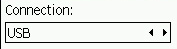
On Windows Mobile 6 Standard, a spin box control allows a user to make a selection from a list by scrolling left and right. The following illustration shows an example of the spin box control.
 Note: |
|---|
|
The standard Windows Embedded CE list box messages can be used to communicate with the spin box control. For information about these messages, see |
The following table lists the Windows Embedded CE styles you apply to the up-down box control to create the spin box control. For an example of how to apply these styles, see How to Create a Spin Box Control.
| Style | Description |
|---|---|
|
UDS_ALIGNRIGHT |
Positions the up-down control next to the right edge of the buddy control. The width of the buddy control is decreased to accommodate the width of the up-down control. |
|
UDS_EXPANDABLE |
Expands the spin box control to a full screen when the user presses the Action key. The standard full screen has a default title. You can specify an alternate title in the up-down control. |
|
UDS_NOSCROLL |
Does not display the up, down, left, or right arrow keys. You must use the UDS_NOSCROLL style with the UDS_EXPANDABLE style so that the user can select data. Do not use the UDS_NOSCROLL style with the UDS_HORZ style. |
|
UDS_HORZ |
Replaces the up and down arrows with left and right arrows. |
|
UDS_SETBUDDYINT |
Causes the list box to scroll the items in the list. |
|
UDS_WRAP |
Enables the user to continue to cycle through the list. |